
Prepia PTCB PTCE Exam Prep
Prepia IncEducation
4.732.00 Reviews
- Version
- 2.1.020
- Installs
- 10.00K
- Age Rating
- Everyone
Screenshots
Our Review of Prepia PTCB PTCE Exam Prep
 Analysis by Appyee
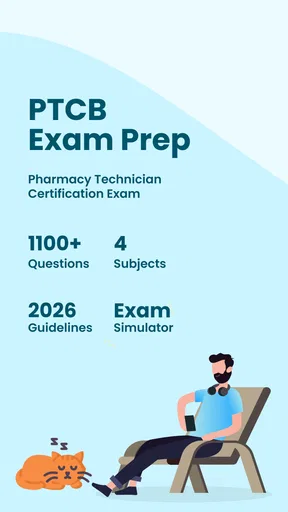
Preparing for a pharmacy technician certification exam is usually less about finding one enormous textbook and more about building a dependable study routine. I found Prepia PTCB PTCE Exam Prep most useful in that role: it turns spare moments into focused practice instead of asking me to plan every session from scratch. It is a free education app from Prepia Inc, aimed at people working toward the PTCB exam, with practice material built around questions rather than long lessons.
That focus makes it easy to understand who should try it. If you already know the basics and want regular question practice, this app can fit neatly into a daily schedule. If you are starting with no pharmacy knowledge and need patient explanations before testing yourself, it is better treated as one part of a broader study plan. I would not rely on it as my only learning resource, but I would gladly use it as a repeatable practice tool.
How it works in a shared household
The most realistic use case is a shared phone or tablet in a busy home. Imagine a pharmacy technician student studying after work while family members use the same device for messages, entertainment, or schoolwork. A short practice session can happen at the kitchen table, during a quiet break, or before bed without requiring a full desk setup. That makes the app more practical than a large printed guide when the available study time comes in small pieces.
I like this kind of arrangement because practice questions create a clear stopping point. You can complete a small batch, review the mistakes you just made, and put the device away. That is easier to coordinate than leaving a book open for hours. It also reduces the temptation to spend an entire session highlighting material without checking whether you can actually recall it.
Shared-device use does require a little discipline. I would avoid handing the phone to another household member in the middle of a question set, because an interrupted session can blur what was answered and what was simply skipped. A better routine is to finish a short block, note the topic that needs work, and then let someone else use the device. If the household has only one device, a simple paper note with the next study topic is surprisingly helpful.
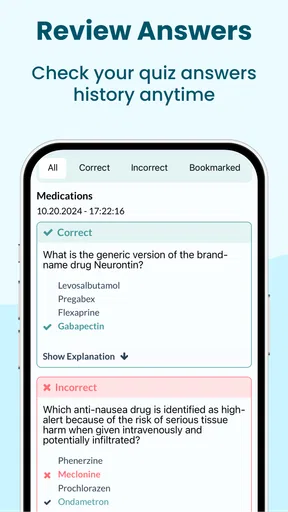
The app is especially convenient for a learner who has already identified weak areas. Instead of opening it without a plan, I would choose one subject for the session, answer questions carefully, and record unfamiliar terms separately. This turns a general question bank into a targeted revision tool. The useful insight is that the app works best as a feedback loop: attempt, inspect the mistake, study the underlying idea elsewhere, and return later to see whether the error has been corrected.
What I would do before sharing the device
Before another person uses the phone, I would close the current study screen and make sure the next user is not answering questions under my session. This is not about adding complicated household rules; it is simply about keeping each person’s activity separate in practice. A shared device is manageable when users agree on clear handoff points.
I would also keep personal study notes outside the app. A notebook or a private notes area makes it possible to record confusing abbreviations, calculations, or vocabulary without assuming that the app itself will organize every detail for me. That separation is useful because practice performance and long-term understanding are not the same thing.
For a household with more than one pharmacy student, coordination matters even more. Each person should use a distinct notebook and avoid treating a shared score or completed question set as proof of individual progress. The app can support practice, but the household still needs a simple agreement about whose turn it is and what each person is reviewing.
Setting boundaries around study and spending
The application is free to install and use, which lowers the barrier for someone who wants to test the study format before committing to it. There are also in-app purchases ranging from about five dollars to around sixty dollars per item. That makes a household conversation about purchases worthwhile, particularly when a device is shared or a younger family member uses the same store account.
I would not let a child or casual device user make purchase decisions on behalf of the exam candidate. The safest everyday approach is to decide in advance whether the free material is enough for the intended routine, then discuss any paid option with the actual learner. A purchase should solve a clearly understood study need, not happen because a prompt appeared while someone else was borrowing the phone.
Price is not the only boundary. Time matters too. A practice app can feel productive while still becoming repetitive if every session is just rapid guessing. I would set a modest daily target and stop when attention drops. For this kind of exam preparation, thoughtful review of an incorrect answer is usually more valuable than rushing through a much larger number of questions.
Another useful boundary is academic honesty. This is a preparation tool, not a substitute for understanding pharmacy responsibilities or workplace procedures. I would use it to check recall and identify gaps, then confirm important concepts with reliable instructional material. That is particularly important for a learner who is memorizing terms without yet understanding how they relate to real pharmacy work.
Where the free approach fits
The free entry point is a strength for cautious users. Someone can see whether the question-based format suits their learning style before spending money. It is also convenient for a student whose budget is limited or whose exam date is not close enough to justify buying every available resource.
At the same time, the presence of paid items means I would compare the app’s value with alternatives before upgrading. A paid package may be worthwhile for a learner who studies consistently and wants more practice, but it is less convincing for someone who opens the app only occasionally. The right question is not whether a larger package sounds useful; it is whether the learner will actually review the results and return to weak topics.
I would also keep expectations realistic about the word “practice.” Question exposure can reveal what I do not know, but it does not automatically teach the reasoning behind every answer. If I repeatedly miss a subject, I would pause the app and use a textbook, class notes, or an instructor’s explanation. Continuing to guess in the same area can create false confidence.
Coordinating a practical study routine
In my experience, the strongest way to use this app is as the testing stage of a three-part routine. First, I learn or review a topic from a fuller source. Second, I use the app to test recall. Third, I write down the reason for each mistake in plain language. That last step is easy to skip, but it is where random question practice becomes useful exam preparation.
A realistic evening might look like this: after finishing a shift, I spend a short period reviewing one pharmacy topic, open the app for focused questions, and then mark two or three concepts that caused hesitation. I do not try to solve every weakness in one sitting. The next day, I review those notes before attempting another set. This spacing helps me distinguish a genuine improvement from a lucky answer.
For shared household use, coordination can be as simple as choosing predictable study windows. One person might use the tablet during a commute or lunch break, while another uses it after dinner. The important point is not to promise uninterrupted access that the household cannot provide. A flexible plan with short sessions is more realistic than an ambitious timetable that collapses after the first interruption.
I would also avoid comparing family members’ progress too closely. One learner may already have pharmacy experience, while another is still building vocabulary. The meaningful measure is whether each person can explain missed questions more clearly over time. A shared device should support cooperation, not turn exam preparation into a competition.
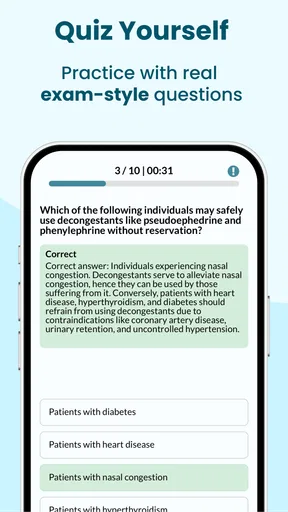
One non-obvious advantage of question practice is that it exposes recognition errors. Sometimes I think I know a term because it looks familiar, but I cannot choose the correct answer when the wording changes. When that happens, I would copy the term into a separate note, define it without looking, and then check the definition. This is more effective than simply remembering which answer was marked correct.
Another useful technique is to read every option before deciding, even when the first answer seems obvious. Exam questions often test distinctions between related ideas, and fast tapping can hide uncertainty. The app is most valuable when I treat each question as a small reasoning exercise rather than a race.
How it compares with common alternatives
Compared with a printed study guide, this app is quicker to start and easier to use in short gaps. A book is usually better for building a structured explanation from the ground up, while the app is better at asking me to retrieve information. I would choose the book or course material when I need context, and the app when I need to find out whether that context has stayed in memory.
Compared with general flashcard apps, a dedicated PTCB practice tool has a clearer purpose. I do not have to create every prompt myself before studying. That saves preparation time, although it also means I have less control over the exact wording and sequence of material than I would with a custom deck.
Compared with video lessons, the app is less passive. A video can explain a difficult idea more gently, but it is easy to watch without retaining much. Practice questions force a decision. My preferred combination is therefore explanation first, questions second, and written correction afterward.
It is also different from a live instructor or study group. The app cannot replace the back-and-forth of asking why an answer is correct or discussing a confusing scenario. Learners who need accountability, immediate clarification, or a complete curriculum may be better served by a class or guided course, using this app only for additional drilling.
Age, trust, and who should use it
The content rating is Everyone, but the practical audience is still mainly people preparing for pharmacy technician certification. That distinction matters in a household. A younger person may be able to open the app, yet the terminology and exam purpose may not be meaningful to them. I would describe it as age-accessible rather than automatically suitable for every child.
Trust is also important when a device is shared. A family member should know that another person’s study activity may be visible on the device, and nobody should alter answers or notes just to be helpful. If several people use the same phone, honest communication is more useful than assuming the app will manage household identities for everyone.
The developer is Prepia Inc, and the app has built a solid early reception, with a 4.7 average from roughly 280 ratings and more than ten thousand installs. Those figures suggest that many users find the format worthwhile, but they do not guarantee that it matches every learner’s needs. I would still judge it by the quality of my own study routine and by whether missed questions lead to better understanding.
The app was released in June 2024 and is currently at version 2.1.020, with support for Android 7.0 and later. For a household using an older Android phone, checking the operating-system requirement before planning around the app is sensible. On a compatible device, the relatively broad system support makes it easier to include an older spare phone in a shared study setup.
Who may want a different tool
I would skip this as a primary resource if I needed a complete beginner course, detailed teaching for every answer, or personal feedback from an instructor. It is also not my first choice for someone who dislikes multiple-choice practice and learns best through demonstrations or conversation. In those cases, a structured class, textbook, or tutor should come first.
I would be cautious about using it alone when the exam is approaching and several major subjects remain unfamiliar. Practice questions can show the size of the gap, but they cannot always close it. The app makes more sense as a companion for revision than as a promise that repeated tapping will cover everything required.
On the other hand, it is a good fit for a learner who already has course material, wants a convenient way to test recall, and can study independently. It is also useful for someone who needs a low-commitment starting point before deciding whether to pay for additional content. The free access gives that user room to evaluate the workflow rather than buying blindly.
My household verdict
After using it as a practice companion, I see Prepia PTCB PTCE Exam Prep as a focused tool with a sensible place in a larger study plan. Its strongest quality is convenience: I can turn a spare moment into active recall, identify weak areas, and return to them later. That is more useful than simply rereading familiar notes.
For a shared household, I would recommend setting clear device turns, keeping personal notes separate, and discussing in-app purchases before anyone taps through a payment screen. I would also make sure the actual exam candidate remains responsible for interpreting results. Family members can help protect study time, but they should not assume that a completed question set equals readiness.
The app’s free starting point, Everyone content rating, broad Android compatibility, and positive reception make it easy to try. The paid items mean users should match spending to a real study schedule, not to a moment of enthusiasm. Most importantly, I would pair the app with explanations from a trusted source whenever a question exposes a deeper gap.
My final recommendation is straightforward: use it if you want regular PTCB-style practice and already have, or are willing to find, material that explains the answers. Do not use it as your only teacher. In the right routine, it becomes a useful checkpoint between studying a topic and truly being able to recall it under pressure. For a household sharing one device, that focused role is exactly what makes it workable.
Verdict
Strengths of Prepia PTCB PTCE Exam Prep
- Focused practice for the PTCB PTCE exam
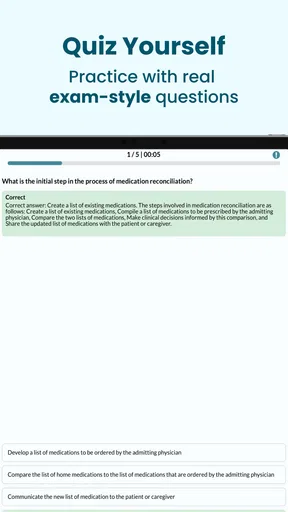
- Includes questions covering key pharmacy technician topics
- Useful for reviewing concepts in short study sessions
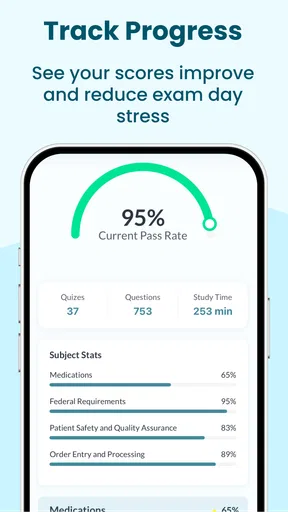
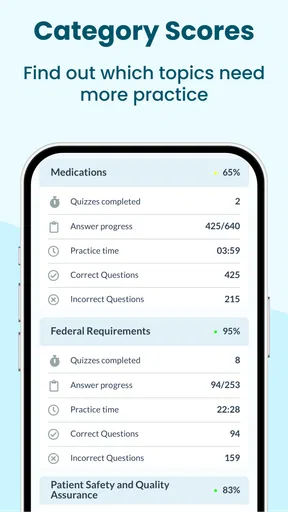
- Progress tracking helps identify weaker subject areas
- Can support preparation alongside classroom or textbook study
Limitations of Prepia PTCB PTCE Exam Prep
- Some content may require a paid subscription
- Practice questions may not fully match the real exam
- Explanations can vary in depth between questions
- Requires consistent self-study to deliver meaningful results
- App quality and available features may depend on device compatibility
Other Releases by Prepia Inc
View All
AMERICAN NURSE EXAM PREP 2026
Education4.8

ASWB BSW LCSW MSW | Exam Prep
Education4.7

ATI TEAS Exam Prep 2026
Education4.7

NREMT EMT EXAM PREP 2026
Education4.6
Similar Picks in This Category
View All
Duolingo: Language Lessons
Duolingo4.7

Google Classroom
Google LLC2.8

Unacademy: Learn & Crack Exams
Unacademy3.2

Bible App for Kids
Life.Church4.4

Cake - Learn English & Korean
Cake Corp.4.7

Brainly: AI Homework Helper
Brainly4.5
Frequently Asked Questions
What is Prepia PTCB PTCE Exam Prep?
Prepia PTCB PTCE Exam Prep is a mobile study app designed to help pharmacy technician candidates prepare for the Pharmacy Technician Certification Exam (PTCE). It typically combines practice questions, topic-based quizzes, explanations, and progress tracking so learners can review pharmacy calculations, medications, safety, law, and other exam-related subjects in a structured way before test day.
Does Prepia cover the main subjects included in the PTCE?
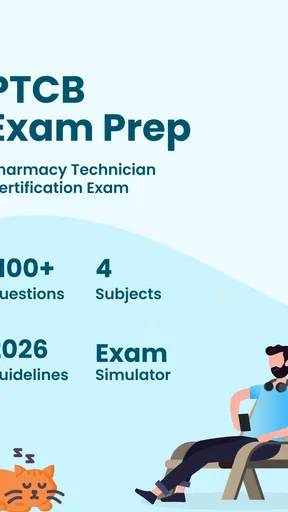
The app is intended to address the major knowledge areas tested on the PTCE, including medications, patient safety and quality assurance, order entry and processing, and federal requirements. However, the exact content and organization may change with updates. Candidates should compare the app’s lessons with the latest official PTCE content outline rather than relying on one study resource alone.
Is Prepia suitable for beginners and experienced pharmacy technicians?
Prepia can be useful for both first-time learners and pharmacy technicians who want a focused review. Beginners may benefit from working through explanations and basic practice questions, while experienced users can use timed quizzes to identify weak areas. Still, the app should complement, not replace, formal training, textbooks, instructor guidance, or practical pharmacy experience.
Can I use Prepia PTCB PTCE Exam Prep offline?
Offline availability depends on how the current version of the app handles lessons, question banks, and account synchronization. Some study material may require an internet connection for initial loading, updates, advertisements, or progress syncing. Before downloading, check the app-store description and test the relevant features, especially if you plan to study while commuting or without reliable mobile data.
Is Prepia enough to pass the PTCE, and does it include official exam questions?
No preparation app can guarantee a passing score, and Prepia should not be treated as a source of official or leaked PTCE questions. Its practice material is best used to build familiarity with concepts, question formats, and time management. For a stronger preparation plan, combine the app with the current PTCB exam outline, official policies, full-length practice tests, and consistent review.
